Start With the Arm Processor Family
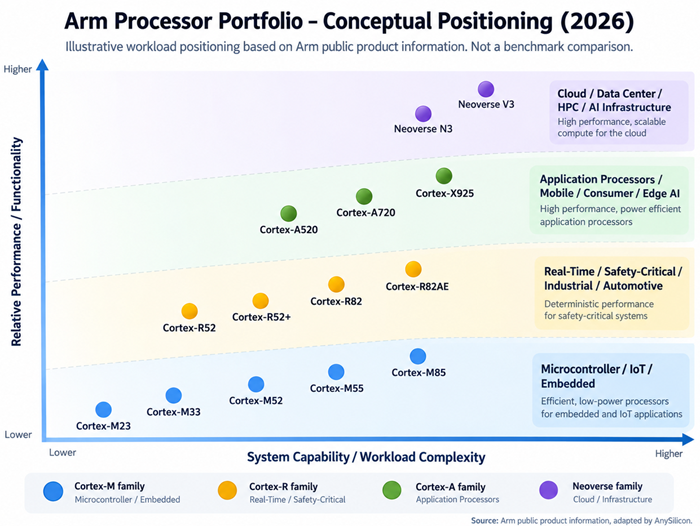
Arm organizes its CPU architecture around three main profiles. The M-profile targets small, energy-efficient embedded systems, the R-profile targets systems with real-time requirements, and the A-profile targets high-performance application processing. Arm’s Neoverse processors also use the application-class architecture but are optimized for infrastructure workloads such as cloud, networking, HPC and AI systems.
| Processor Family |
Typical Applications |
Main Selection Driver |
| Cortex-M |
MCUs, IoT, sensors, wearables, embedded control, endpoint AI |
Low power, low area, deterministic embedded operation |
| Cortex-R |
Automotive control, storage, industrial systems, safety-critical real-time applications |
Deterministic real-time performance and functional safety |
| Cortex-A / Cortex-X |
Linux systems, mobile devices, consumer electronics, automotive compute and rich embedded systems |
Application performance and rich operating-system support |
| Neoverse |
Cloud, networking, telecom infrastructure, data centers, HPC and AI infrastructure |
Scalable compute performance and performance per watt |
This first decision can eliminate much of the portfolio. A battery-powered sensor does not normally need an application processor, while a Linux-based edge computer is unlikely to be well served by a small microcontroller core.
1. Define the Software Environment
Software is often the fastest way to narrow the CPU choice. If the product runs bare-metal code or a small RTOS, a Cortex-M processor may be sufficient. If it requires Linux, Android or another rich operating system, an application-class processor is generally more appropriate.
Real-time systems require another distinction. Some products need predictable interrupt latency and deterministic response rather than maximum average throughput. Cortex-R processors are designed specifically for this class of workload, while newer Cortex-R82-class processors also add capabilities such as 64-bit processing and MMU support for richer software environments.
Existing software can be equally important. Reusing a validated software stack, safety package, middleware or development environment may save more engineering time than selecting a theoretically faster core.
2. Estimate the Performance You Actually Need
CPU performance should be defined from the workload rather than from marketing numbers. Consider interrupt rates, control-loop deadlines, operating-system overhead, protocol processing, application code, DSP workloads and the amount of headroom required for future software.
Do not rely on clock frequency alone. Two Arm cores operating at the same frequency can deliver very different performance because of differences in pipeline design, cache architecture, memory subsystem and instruction capabilities.
For high-end embedded applications, Cortex-M85 is currently positioned by Arm as its highest-performing Cortex-M processor and includes Helium vector-processing technology. Cortex-M55 provides mainstream DSP and machine-learning capability, while Cortex-M52 targets smaller, cost- and power-sensitive designs that still require Helium support.
3. Consider DSP, Machine Learning and Vector Processing
Many embedded processors are no longer used only for control code. Audio processing, motor control, computer vision, sensor fusion and small machine-learning models can create significant DSP requirements.
If these workloads are important, check whether the candidate core supports the appropriate vector or DSP extensions. Cortex-M52, Cortex-M55 and Cortex-M85 can include Arm Helium technology for DSP and ML acceleration. Application-class and infrastructure processors may use technologies such as Neon or Scalable Vector Extensions, depending on the processor and architecture.
For larger AI workloads, the CPU may also work alongside an NPU or other accelerator. In that case, CPU selection should consider orchestration, memory movement and system-level performance rather than CPU inference performance alone.
4. Determine Whether Real-Time and Functional Safety Are Required
Automotive, industrial, robotics, medical and storage systems may have strict timing or safety requirements. If the CPU must respond within guaranteed timing bounds, deterministic behavior can be more important than peak performance.
Cortex-R is Arm’s real-time processor family. Current options include Cortex-R52, Cortex-R52+, Cortex-R82 and Cortex-R82AE. Arm positions Cortex-R82AE as its highest-performing real-time safety processor, combining high single-thread performance with real-time and functional-safety capabilities.
Safety requirements should be identified early because they affect much more than CPU selection. They can influence lockstep implementation, memory protection, diagnostic coverage, safety documentation, software architecture and the overall SoC development process.
5. Balance Performance Against Power and Silicon Area
More CPU performance normally comes at a cost. A larger processor may consume more silicon area and power and require larger caches, a more capable interconnect and a higher-performance memory system.
For an always-on battery-powered product, reducing active and leakage power may be more valuable than maximizing benchmark performance. For a data-center processor, the calculation is different: performance per watt, memory bandwidth and scalability across many cores become key system metrics.
This is why selecting a CPU should be treated as an SoC-level decision. The CPU cannot be evaluated independently from the cache hierarchy, SRAM, DDR subsystem, interconnect, accelerators and process technology surrounding it.
6. Check 32-bit vs 64-bit Requirements
Word size can quickly narrow the available choices. Small embedded applications can often remain 32-bit, while applications requiring large address spaces, rich operating systems or modern infrastructure software increasingly require 64-bit support.
Do not select 64-bit simply because it appears more advanced. If the application does not benefit from the larger address space or software environment, a smaller embedded implementation may provide better power, area and cost efficiency.
7. Evaluate Security Requirements
Security capabilities should be considered at the beginning of CPU selection rather than added after the SoC architecture is complete. Depending on the core, relevant technologies can include TrustZone, privilege separation, memory protection, pointer-authentication features and support for secure execution environments.
The correct security architecture depends on the threat model. A connected sensor, automotive controller and cloud processor have very different security requirements even though all may use Arm CPU technology.
8. Consider the Complete SoC Ecosystem
The CPU is only one IP block. Before final selection, evaluate the surrounding ecosystem: interconnect IP, debug and trace, interrupt architecture, memory controllers, development tools, compilers, RTOS or OS support, software libraries, verification IP and available physical implementations.
It is also important to consider the target foundry and process node. A core that fits comfortably in one technology may have a very different power, frequency and area result in another. The final decision should therefore be based on implementation targets rather than processor specifications alone.
Do Not Choose an Arm Core on Performance Alone
The best Arm CPU core is the one that satisfies the complete product requirement with the lowest unnecessary complexity. Start with the software model and workload, determine whether real-time behavior or functional safety is required, estimate realistic compute performance, and then consider power, area, security, memory architecture and process technology.
A small Cortex-M processor may be the best solution for an embedded controller. A Cortex-R processor may be the right answer for deterministic real-time processing. Cortex-A or Cortex-X can support richer application workloads, while Neoverse targets scalable infrastructure compute. The important point is that these processors solve different problems; they should not be ranked on a single performance axis.
Once the processor family has been identified, compare the remaining candidates using workload-specific benchmarks and implementation data. That approach usually produces a more efficient SoC than simply starting with the most powerful available core and scaling backward.
Sources
Technical basis: Arm CPU Architecture and Processor IP product information, including current Cortex-M, Cortex-R, Cortex-A/Cortex-X and Neoverse portfolio information. Processor capabilities and availability evolve over time; confirm the latest Arm documentation before making a final IP selection.